Django template filters are amazing. Formatting data in a variety of ways is so much easier with filters. More than one filter can be chained together to transform your data which is too complicated to process otherwise. Here, I will be talking about how you can create your own template filter according to your need. Follow the steps below to Create your custom Django template filter for specific characters replacement.
Create templatetags directory
Create a new directory with the name of templatetags in
your project's app directory. It does not matter which app, you can use any existing app in
your project. If you don't have an app yet, you can create one by using below command:
python3 manage.py startapp blog
After creating new app, in order to use it, you have to make sure your app is specified in INSTALLED_APPS block in settings.py file.
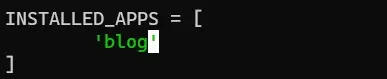
Once app is added in INSTALLED_APPS block in settings.py file, we can use {% load extras %}
tag to load custom filters into our template. So make sure app is added otherwise you will get invalid filter error.
templatetags script
Now create two python files: __init__.py and extras.py inside templatetags directory. Leave the __init__.py file
blank. Open extras.py and paste the following code:
from django import template
register = template.Library()

@register.filter(name='c_filter')
def c_filter(value):
    return value.replace("#", " ")
- template.library() is a module-level variable. These module level-variables are always defined on top of the project outside on any class or function. Here we are using this to define a filter that will work in current project globally.
- Next we have name='c_filter' which is the name of our custom filter. The name that we specify here will be used to call this filter in Django template.
- In the function, return value.replace is replacing # with " " which is an empty string. Now we can call this custom filter in our Django template.
Usage of custom filter
To start using this custom filer, create a new test.html page and load this filter by adding {% load extras %} in the top of page. Here I'm using load extras because my custom templatetags file name is extras.py. If you created file with different name, update the name here as well. Then write this code in HTML page to test:
{% load extras %}
{% with query="Protocolten:#This#tutorial#is#about#making#custom#filter" %}
<p>{{ query | c_filter }}</p>
{% endwith %}
I'm assuming that you already have urls.py and views.py setup accordingly to render the test.html page. Now access this page in the browser and you'll see the similiar output as below image:

As you can see above, our filter will check each character inside the variable query and It'll remove any character or special character in our case, that matches with #. If you are fetching data from your views,py, then you can apply this filter on that data like a normal filter.
{{ post.post_body | c_filter }}
This way you can create your own custom Django template filter and use it throughout the project.